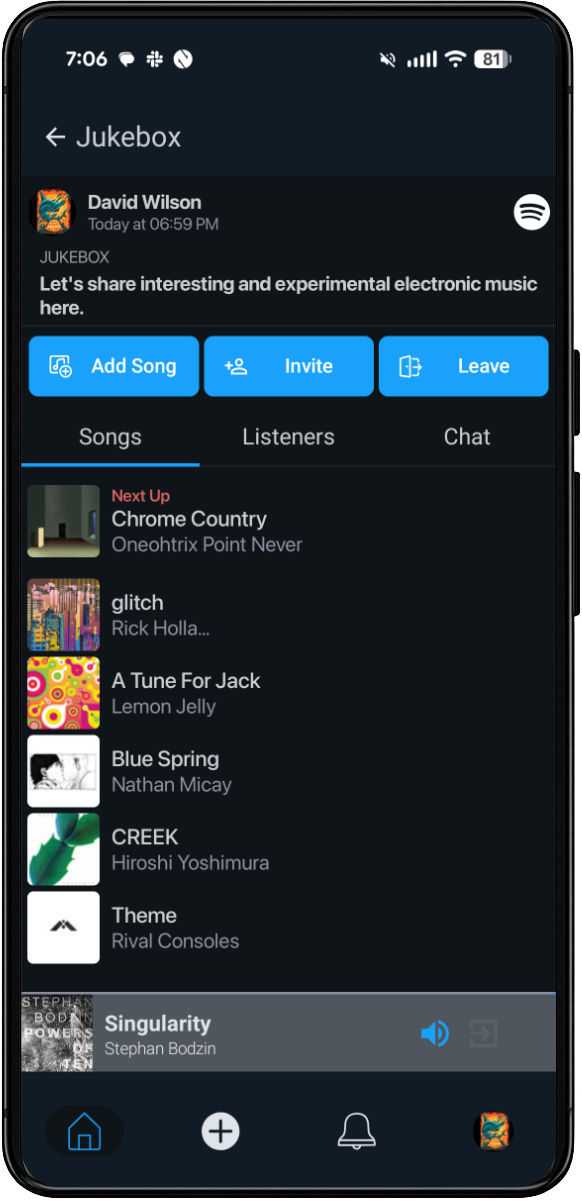
Jukebox Basics
Earbug's jukebox feature lets multiple music fans join a jukebox session together and add songs to the jukebox queue. The jukebox creator can set up the queue to be turn-based or can control the order of the songs in the queue. Fans in the session can also text chat with each other while songs are playing.
Cross-Platform Jukeboxes
Earbug has integrated with Spotify, Apple Music, and YouTube Music, enabling music fans to join and play in jukeboxes together, regardless of which streaming platform they use.
Local Jukeboxes
Fans can create local jukeboxes when everyone will be in one place – best for events like parties, dinners, car trips, and the like. In a local jukebox, everyone at the event can add songs to the jukebox queue, but songs play back only through the streaming service of the jukebox creator, typically on a stereo system to which the creator's device is connected via Bluetooth.
Guest Access
In local jukeboxes, any fan in the jukebox session can tap an icon to display a QR code. Other event attendees can scan the code with their phone to join the jukebox session as a guest on a mobile web guest app, without the need to install the Earbug app, for a friction-free experience.
Remote Jukeboxes
Fans can create remote jukeboxes when everyone is in different places – great for jam sessions with co-workers or hanging out with remote family and friends. In remote jukeboxes, the songs play back synchronously on each person's streaming service on their own device.
Public Jukeboxes
Public jukeboxes are a great way to let other music fans around the world join you in sharing and discovering music focused on a particular musical genre or theme.
Private Jukeboxes
Private jukeboxes are limited to friends you invite to join, so you can have an undisturbed, safe space to hang out and share music with people you know.